Protect the secret
The key secret appears only at creation. Store it in a secrets manager or a server-side environment variable. Never put it in front-end code, a repository, logs, or a URL. The API rejects secrets in URLs; send the pair with HTTP Basic.
Create one key per integration to limit the impact of replacement. If you suspect exposure, revoke the key immediately and replace it. For planned changes, rotate it: the old pair remains valid for 24 hours while you update servers.
Allow only project IPs
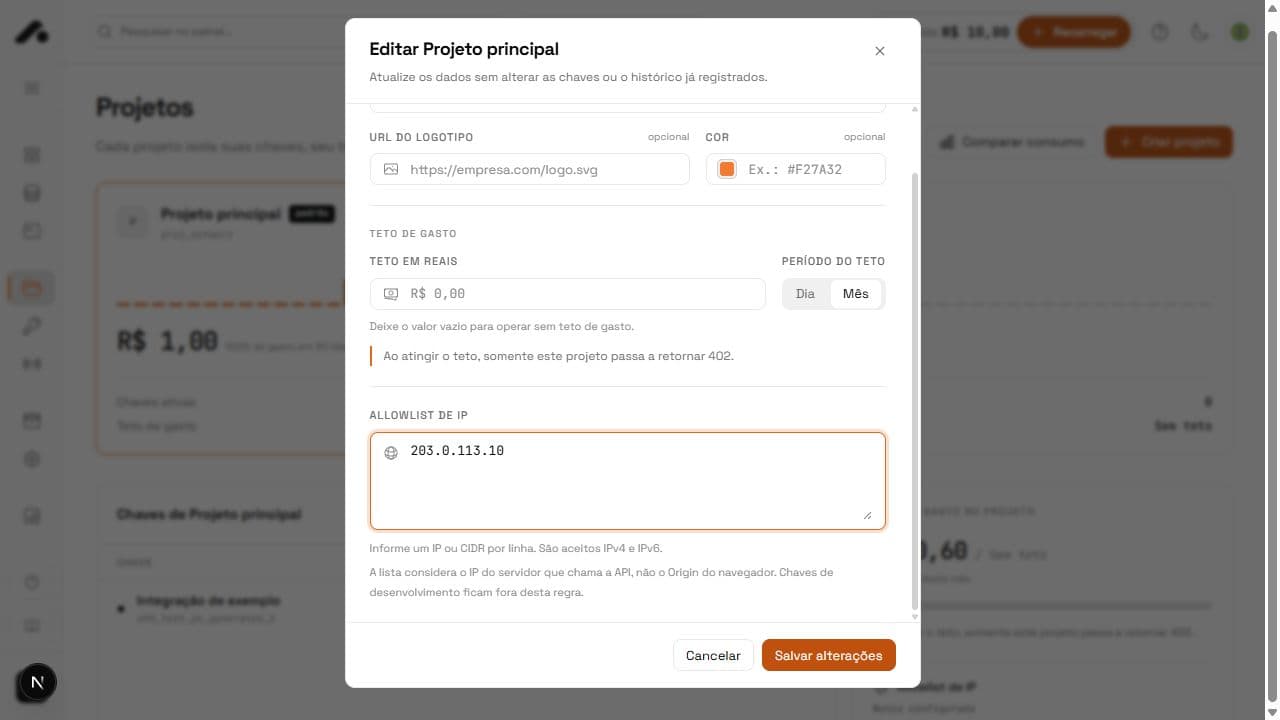
- Under Projects, open the project used by the integration.
- Add every server's public egress address to the IP allowlist.
- Test a call from the server before restricting access from other environments.
With an active list, a request from another IP returns 403 ip_not_allowed. If your IPs change, update the list before moving execution. This restriction belongs to the project, not the whole account.
Bind the key to the right project
When creating a key, choose Entire account for an integration that selects projects via X-Project-Id, or Only this project for one specific project. A bound key rejects a different project. Check its scope too: when a key cannot reach a service, the API returns 403.
Rotate without downtime
Use Rotate under API keys to generate a new pair with the same environment and restrictions. Save the new secret immediately and update every server within the 24-hour period in which the old pair still authenticates. Then check calls by log_id. Revocation takes effect immediately and cannot be undone.
Verify a response signature
When your integration needs proof of origin and integrity, verify the Ed25519 response signature. Fetch the public key published at /.well-known/api4devs-keys.json. The key_id identifies the key used and supports public key rotation.
curl 'https://staging.apifordevs.com/api/v1/.well-known/api4devs-keys.json'
Use the Response signature guide to verify the exact bytes and headers. Do not transform the body before verification, as that may invalidate the signature.
Quick answers
No. The API does not accept URL secrets. Send the pair through HTTP Basic from your server.
Your server's public egress IP is not in the project's allowlist. Add it under Projects.
Not immediately. The old pair stays valid for 24 hours. Revocation stops it at once.