Know what belongs to the account
Balance and keys belong to the account. A project separates metrics and applies its own limits, but requests draw from the same balance. Use projects to distinguish clients, products, or operating environments while keeping a consolidated view.
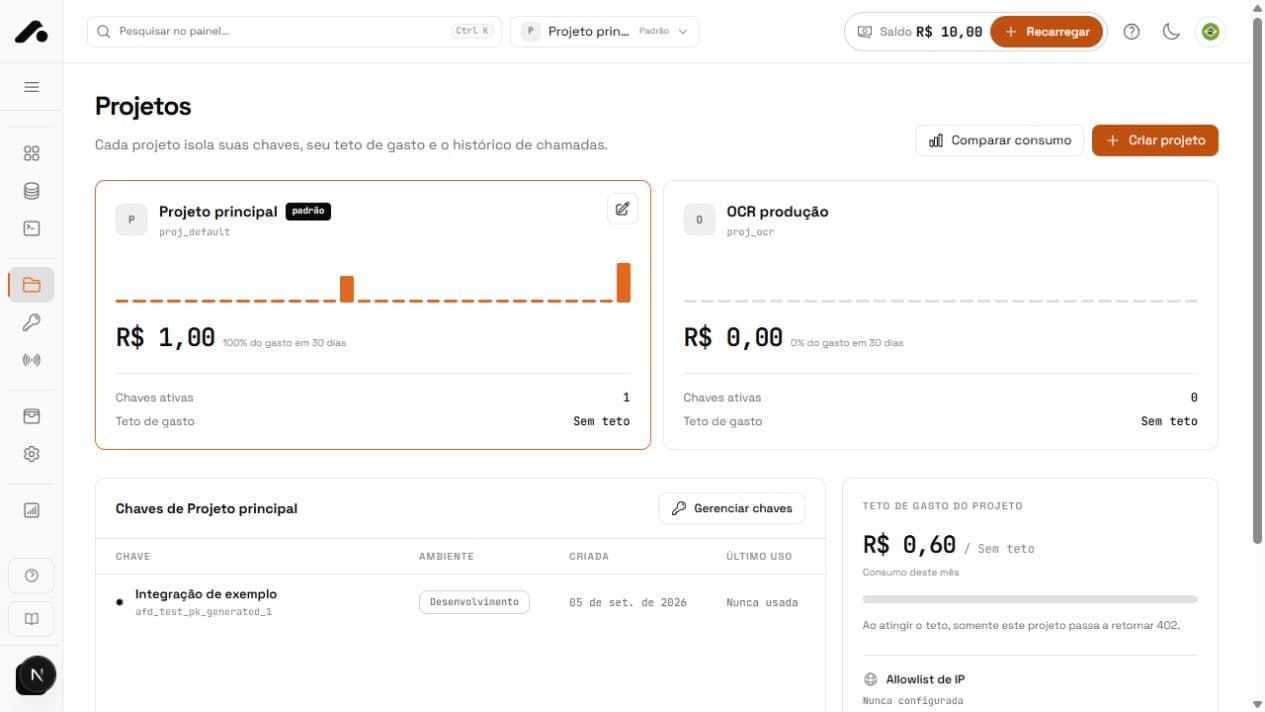
The selected project in the header changes dashboard lists and context. In the API, send X-Project-Id to select the request's project. A project-bound key only accepts its own project.
Use the default project
Each account starts with a default project. If an account-wide key sends a request without X-Project-Id, the API uses that project. It cannot be archived, so requests without the header always have a valid destination.
Create a project
- Open Projects and click Create project.
- Give it a clear name, such as the client or product it serves.
- Choose a color and optionally a logo to recognize it in the dashboard.
- After creation, select it in the header to view its data.
Color and logo are visual aids; they do not change access. To isolate an integration, create a key bound to Only this project under API keys.
Set a spending limit
Set a daily or monthly spending limit to control a project's usage. This does not create a separate balance. The account continues to use its shared wallet. Follow usage under Calls and Balance and statement.
You can also configure an IP allowlist. Once enabled, only authorized addresses can call on the project's behalf; others receive 403 ip_not_allowed. Add all server egress IPs before enabling it.
Archive without losing history
Archive a project that should receive no new requests. History remains available, but new requests to it return 400. Update or stop integrations before archiving. The default project cannot be archived.
Quick answers
It receives requests without `X-Project-Id`. It is created with your account and cannot be archived.
No. Balance belongs to the account; projects separate metrics and can have daily or monthly spending limits.
It stops accepting requests. The API returns 400 with a message that archived projects cannot accept requests.