Filter calls
Open Calls. Use period, project, service, and status filters to narrow the list. The project selected in the header also sets the screen context. Sort by date to review a sequence of attempts.
- Choose the period when the request occurred.
- Select service and status if known.
- Open the matching row for the full execution details.
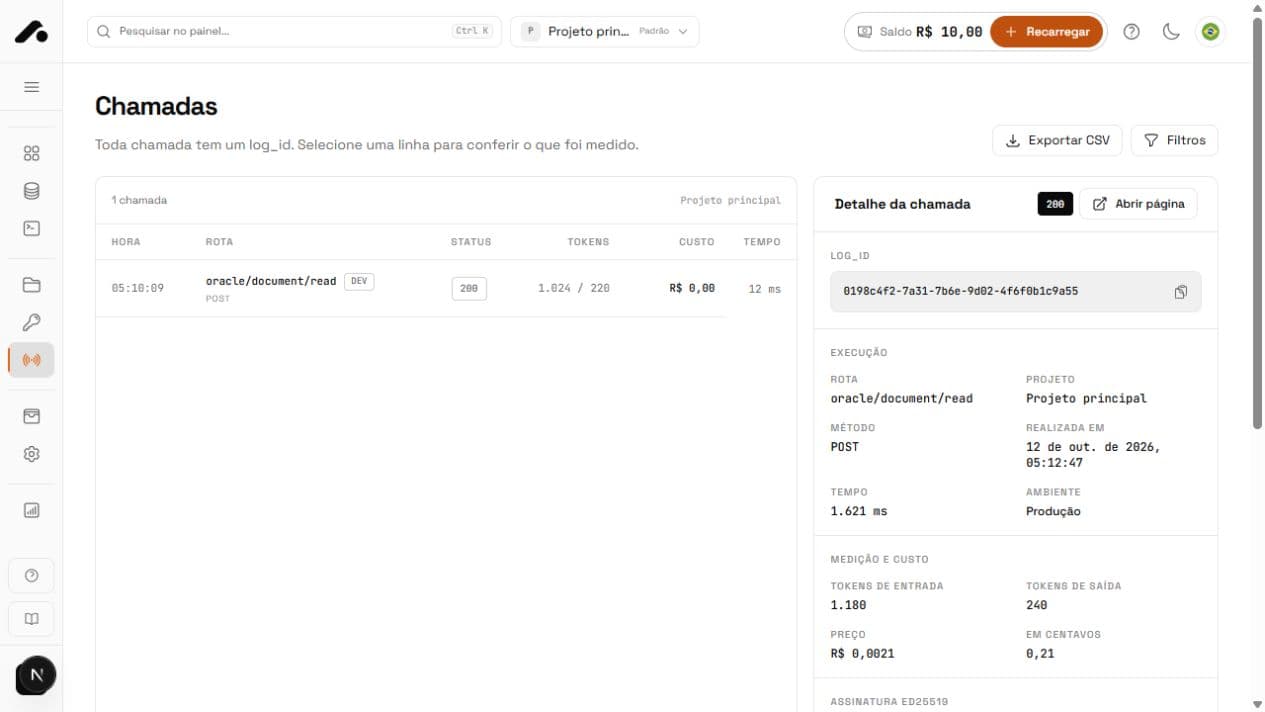
Use the log_id
The API returns X-Api4devs-Log-Id in the HTTP header. With summary=true, the same ID appears in JSON at header.log_id. Store it alongside the operation record in your system. It lets you find the exact call in the dashboard and speeds up investigation.
Read execution details
The detail includes status, service, project, time, duration, price, tokens for token-based routes, and the returned header. Compare these with the response recorded by your app. The real call price appears here even when it differs from the typical Catalog price.
| Data | Purpose |
|---|---|
| Status | Distinguish success, validation, limits, and temporary failures. |
| Price | Reconcile a 2xx debit with the statement. |
| Tokens | Understand variable input and output charges. |
| Header | Check log_id, DEV mode, and execution metadata. |
Recognize a simulation
Development calls appear in history with zero price. They validate the contract but do not execute the real service. To compare with Production, repeat with a Production key and without dev_mode, then inspect both records by status and log_id.
Quick answers
It identifies each request. Find it in the `X-Api4devs-Log-Id` HTTP header or, with `summary=true`, in `header.log_id`.
Open the request. Its returned header shows the price, token use, and whether it was charged.
With `summary=true`, the response is signed (Ed25519). The public key is at `/.well-known/api4devs-keys.json`.