Find a route
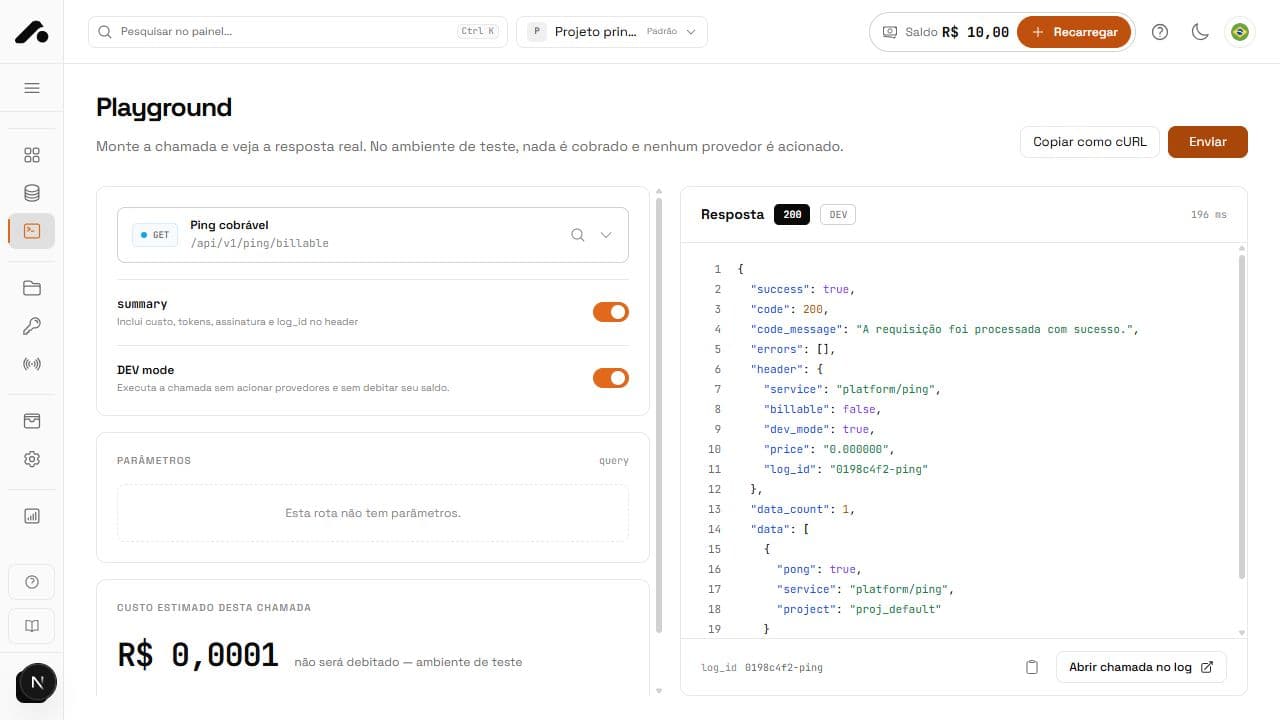
Open Playground and search the route selector. Search by title, path, or category. Results are grouped and show a summary and typical price, helping you distinguish similar services before opening a form.
- Type part of the API name or path.
- Check each result's category and summary.
- Select a service to load its documented fields.
Fill the parameters
Each field shows its name, type, location — path, query, body, or file — and whether it is required. Select a listed option when one exists. For file fields, choose the file and check its name before sending. Examples and descriptions explain the expected value.
Path values go in the address; query values go in the URL; body and form-data values go in the body. Playground validates required fields before sending. Do not use a slash, . or .. alone as a path value.
Choose simulation or live execution
With a Development key, enable DEV mode (dev_mode=true). The API simulates a response in the real format and does not charge. To execute in Production, use a Production pair, disable DEV mode, and review the estimated cost first.
Read and reuse the response
After sending, check status, duration, JSON, and log_id. Enable summary if you need billing metadata in the response header. Use log_id under Calls to find the same execution and its final price.
Use Copy as cURL to take the request to your terminal or code. Replace real credentials and personal data with examples before sharing it. A free, open route such as public company lookup runs without a key or charge.
Quick answers
No. It simulates a response in the real format, and the price stays at zero.
Without DEV mode, the request is real and may be charged. Playground uses the Production pair you provide, just as your application would.
Use Copy as cURL and replace the secret with an environment variable.